
Explain Everything™ VPP Interactive Whiteboard1.62 - App Store
You'll be able to see results in few seconds.
Publisher Description
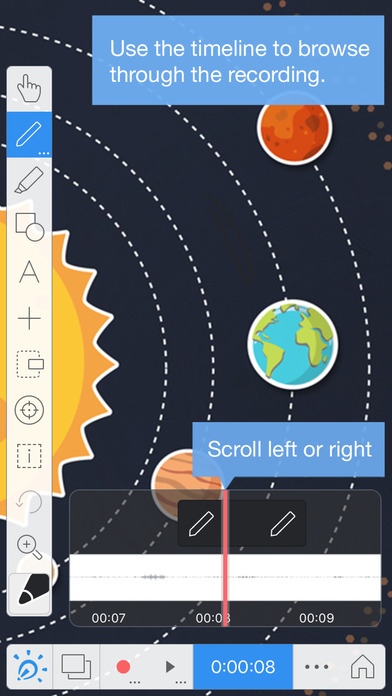
Explain Everything is an easy-to-use design, screencasting, and interactive whiteboard tool with real-time collaboration that lets you animate, record, annotate, collaborate, and explore ideas, knowledge and understanding. It provides teachers and students an opportunity to share thinking, reflect upon knowledge building, and assess both products and processes of learning.
Please note: Explain Everything VPP is a version of Explain Everything designed for standalone, one-time purchases via Apple s Volume Purchase Program (VPP) store. No subscription is required. School districts, businesses, and other institutions that already use VPP for bulk purchases can get this version of Explain Everything for easy purchasing and distribution.
Note: If you need additional tools for administering large group deployments, please consider the subscription-based version of the app (https://itunes.apple.com/app/explain-everything/id1020339980).
ANIMATE YOUR THINKING
The most dynamic and easy-to-use interactive screencasting whiteboard for iPad
Create slides using an infinite canvas, use a laser pointer, draw in any color, add shapes, text, videos, images and audio files,
Rotate, move, scale, flip, copy, paste, clone and lock any object added to the stage,
Record everything you do within the app (even yourself while using the front-facing camera) to create high quality, creative and valuable content for others to learn from!
Import many common file types including PDF, DOC, PPT, XLS, RTF, TXT, HTML, KEYNOTE, PAGES, NUMBERS, JPG, BMP, PNG, GIF, MP4, MOV, MP3, M4A, WAV, AAC and more
Prepare lessons, tutorials, guides of any kind and upload them as videos to YouTube or Vimeo to share with others.
Browse and download content from Explain Everything Discover, a community portal for accessing, sharing, and publishing editable project files.
2-tap export of content to Explain Everything Discover; easy export to all other destinations including Drive, Dropbox, Box, and more
Create private and public folders on EE Discover
EXPLAIN EVERYTHING...TOGETHER!
Collaborate with other users in real-time.
Host or join real-time collaborative sessions with complete interactive whiteboard toolset
Enable view-only mode or enable editing for participants in hosted collaborative sessions.
Allow participants to save copies of the projects to their own devices after a collaborative session
SHARE AND DISCOVER
Export projects to Explain Everything Discover, a content portal for sharing, publishing, and downloading editable project files.
Compress projects to videos (MP4) in the cloud or locally on your device (no internet access needed)
Share unique CODEs for easy project sharing and account management
Send invitations to access private folders
Give students pre-prepared projects and templates to open on their iPads, work on them and view, share, or present the work in support of reflection, feedback and ongoing assessment.
BEYOND AN EDUCATIONAL APP
Tools for design thinking - create idea boards, stories, prototypes, sketchnotes, and presentations
Document learning and support formative assessment with photos, videos, documents, and screencasts with animations and voice
Create and share interactive templates for problem-based learning activities
Privacy policy: http://discover.explaineverything.com/discover/policy
Terms of use: http://discover.explaineverything.com/discover/terms
Requires iOS 8.3 or later. Compatible with iPhone, iPad, and iPod touch.
About Explain Everything™ VPP Interactive Whiteboard
The company that develops Explain Everything™ VPP Interactive Whiteboard is Explain Everything sp. z o.o.. The latest version released by its developer is 1.62.
To install Explain Everything™ VPP Interactive Whiteboard on your iOS device, just click the green Continue To App button above to start the installation process. The app is listed on our website since 2016-06-24 and was downloaded 0 times. We have already checked if the download link is safe, however for your own protection we recommend that you scan the downloaded app with your antivirus. Your antivirus may detect the Explain Everything™ VPP Interactive Whiteboard as malware if the download link is broken.
How to install Explain Everything™ VPP Interactive Whiteboard on your iOS device:
- Click on the Continue To App button on our website. This will redirect you to the App Store.
- Once the Explain Everything™ VPP Interactive Whiteboard is shown in the iTunes listing of your iOS device, you can start its download and installation. Tap on the GET button to the right of the app to start downloading it.
- If you are not logged-in the iOS appstore app, you'll be prompted for your your Apple ID and/or password.
- After Explain Everything™ VPP Interactive Whiteboard is downloaded, you'll see an INSTALL button to the right. Tap on it to start the actual installation of the iOS app.
- Once installation is finished you can tap on the OPEN button to start it. Its icon will also be added to your device home screen.
Program Details
System requirements
Download information
Pricing
Version History
version 1.62
posted on 2016-06-24
Disclaimer
Official App Store Link
We do not host Explain Everything™ VPP Interactive Whiteboard on our servers. We did not scan it for viruses, adware, spyware or other type of malware. This app is hosted by Apple and passed their terms and conditions to be listed there. We recommend caution when installing it.
The App Store link for Explain Everything™ VPP Interactive Whiteboard is provided to you by apps112.com without any warranties, representations or guarantees of any kind, so access it at your own risk.
If you have questions regarding this particular app contact the publisher directly. For questions about the functionalities of apps112.com contact us.
